Show and tell M3

I am not super happy with how far we got when it comes to kinaesthetic interaction, but I see it more as the first testing of it. Now I can start to see how you can work with bodily movements when creating a kinaesthetic interaction. And I think that the reason we didn’t achieve as much as we could is that we weren’t as sharpened as other groups into what kinaesthetic experience we wanted to use. We didn’t start with the body. We started with the framework. One group had used what they called a kind of paper prototyping where they, in a quick and easy way, could test out different moments to get a first indication of how a movement would work. I find this inspirational because we could have done more of this quick and easy testing but with a more structured aim for what and the way we wanted to test a movement.

We received the feedback that we had been doing blind explorations because we more tried and then saw where it led us. And I think that that is true. Looking back at our project, I can feel that we missed out when moving over to social interaction. We should have worked more with what kinaesthetic experiences of our first sketch and tried to see what we had that worked/not worked and try to create a richer interaction. Changing over multiple bodies and designs with the aim for social kinaesthetic interaction became more like a way to leave the other interaction when it started to become hard.

Another factor that I feel has influenced the work too much is that we used the theremin as an inspiration. We kept attributes from the interactions with the actual instrument too much. It almost became a constrain for us, and everything went back to how the original worked in some way. Even if the body parts might be different, then the direction of the movement might still be the same. One feedback that we received during the show and tell might have helped us and it was when designing based on something already existing you should take a decision during the exploration to completely step away from how it works today to see if you can find something new to it. This could be seen as Making it strange which Loke and Robertson (2008) states are a methodology to work with movements so “unsettling habitual perceptions and conceptions of the moving body to arrive at fresh appreciations and perspectives for design that are anchored in the sensing, feeling and moving body.” (Loke & Robertson, 2008, p. 81).

I think that if we could have let go of what we already knew, then we might have landed in something that did not involve arms or hands because even though we from the begging wanted to try other body parts and movements, we never really got to do it. I think it is because we are so locked in our normal behavior for how to interact.

Interactivity has been a challenging course in a good way. After every module, I have had the feeling of ‘okay now I feel ready to start because I now have an understanding of what it is we are doing’. I wish I had the time to redo the projects with the knowledge I have now. Because then I think I would feel that I actually explored the topics and materials to a greater extent.

Loke, L., & Robertson, T. (2008, December). Inventing and devising movement in the design of movement-based interactive systems. In Proceedings of the 20th Australasian Conference on Computer-Human Interaction: Designing for Habitus and Habitat, pp. 81-88.
The last sketches

Perhaps I had too high thoughts of what we are able to do because this week the work hasn’t turned out the way I wished. A lot of time has gone to make it more of a socially kinetic interaction, and I think we have made progress. Now both person controllers bother the volume and the pitch making it possible to interfere och cooperate in how the sound should be. We also managed to do some quick sketches where we tried different body parts. Still, I feel that we don’t have time to test the movements and work with them to find nuances in the interaction and how to use this for the control so we can reach a more nuanced control and a richer expressivity. We also didn’t manage to use our desired movement for the arms because of our ability to make the code work. So instead we needed to go back to the wrist movement. It would have been interesting to test the movements that we have body stormed but sometimes we just don’t know how to make that happen and after trying for a while we need to continue on with something else.

two people controlling freq(nose) and the vol(right wrist) depending on how close you are to each other

two persons controlling the frequency with their arms

tow persons controlling the frequency with arms and volume by squatting

This was our last sketch, and I feel that we were still just in the beginning of exploring and creating a kinaesthetic interaction, but this is as far as we managed to come.

What have we created?

Moving over to working with multiple bodies hasn’t been easy since we have needed to work over Zoom for a couple of days. We can’t try out movements together. We can discuss them, and then we need to get another person to try out the movement with me to see if it works. It is not the same as us digging deep into what it is we want out of the interaction and how we can make it a social interaction.

The first sketch we made was with one person controlling the pitch and one controlling the volume, which we then showed for the coaching.

One feedback that we received was that it isn’t really a sociality to the interaction. It is more like two persons having a task each, and they can’t affect each other. And I don’t know how we can’t have seen it because it feels so apparent when pointed out. So now we need to find a way to let both persons’ movements control the expression collectively.

Another change that we will do is to change the movement. Using the wrists to control the frequency and volume is not working out as we want. The kinaesthetic feeling is off. It doesn’t feel balanced. For now, we have used just one arm on each person, and we think this makes it hard to get it to feel like a nice movement. The way it is now kind of stretches the side of your torso. To test new movement, we made a new body storming where we aimed to use both sides of the body. We found some movements that felt nice and where you feel that you can control your movement in a smooth and easy way.

One movement that felt much better when doing it for a while was this position.

I think this movement feels nice as long as you are able to move the arms. Otherwise, it will quite quickly be tiring, but it will work because we will not use it as a fixed pose for our purpose. We want it to be a living movement that you will use together with the other person.

For the volume control, we are thinking of using the whole body and working with the positions of the shoulders. We want to separate the frequency and volume control so they don’t use the same body parts since we found it confusing when we used the wrist for both. It wasn’t always clear which person controlled what. We also feel that it would be interesting to test something that isn’t using hands or arms since most interactions today are made for the hands, and using arms instead feels like just taking the second-best, and perhaps there is something in not using your arms or hands.

I think that we will try to test these movements instead.

Theremin

To start working with multiple bodies, we began to test out the framework, and when we had gained some understanding, we started working on our new sketch. We want to continue to work with the control of sound, but what if we together could play something with our combined movements so we also could bring in a social aspect to the interaction and create more expressiveness?

When we had some idea about what we were interested in, we tried to find some inspiration for how we could test this, and that is where the Theremin comes in as an inspiration. The Theremin is an electronic instrument that you can play without touching the instrument you play by interacting with space by using different movements. By doing so, you can adjust the pitch and the volume.

https://www.youtube.com/watch?v=njnzgmnzLCU

We decided to use tone.js to generate the sound. This was not as easy as we thought when using it together with Glitch. We spent about a day trying to solve it and didn’t manage to do it. But luckily, we could get help from others the following day. This shows how much easier it is when we can work in the studio and how an open and sharing work setting really help. I feel that being back at the university have changed my understanding of what we are doing. Last year I missed having persons to discuss and talk about the projects that we were doing. You almost always just saw your process, so following what others do and how and why they do it the way they are doing helps me get a deeper understanding.

For our first sketch, we will use each person’s wrists to be the input that controls the pitch and the volume of the sinus wave. At this stage, it feels like we need to get something to work and then we can continue to explore what movement would be the best. And to try different body parts.

Kinaesthetic interaction: Sociality

After a first week of reading up on literature and testing how the framework works and making some sketches, we felt that we needed to get some more input from Jens during the coaching since we didn’t really feel any direction for what we were doing. We had discussed what we were interested in and after reading Kinesthetic interaction: revealing the bodily potential in interaction design (Fogtmann et al. 2008), we both felt that it would be interesting to work with a kinaesthetic interaction that has a sociality parameter. Fogtmann et al. (2008) present seven Kinesthetic Design Parameters where the sociality parameter is described in the following way.

Sociality relates to designing for a body among other bodies. By designing Kinesthetic Interaction, the interaction often moves into a collaborative and social place, where others are invited to take part in the interaction, actively or as spectators.” (Fogtmann et al., 2008, p 93)

This was something we found interesting and wanted to explore further. Jens also encouraged us to explore the social aspect further and explore the possibilities with two body detection. I think there is something interesting in how your movements and the interaction you are making are affected by other persons’ movements. So I think we will continue to explore multiple body movements this week.

Feedback on the sketch that we had made is that we could add more nuanced control to it. Right now it is working more as a slider for the volume, but we could explore it further and see how we can work with the kinaesthetic to add more control and in that way also expressiveness.

Fogtmann, M. H., Fritsch, J., & Kortbek, K. J. (2008, December). Kinesthetic interaction: revealing the bodily potential in interaction design. In Proceedings of the 20th Australasian conference on computer-human interaction: designing for habitus and habitat, pp. 89-96.

Volume control

In our body storming, we had found out that the feeling of control will change quite easily with small changes. We wanted to continue with control and decided to test if we could get a well-established movement to work. Holding your hands over your ears is a movement we have done since we were small children to shut out the sound. How well can this movement be translated into an interaction with a computer? This is something that we can test with the help of the machine learning program.

With this sketch, we wanted to test arm movements and especially how we can work with the wrist positions to control the volume.

From the body storming, we had the idea that the wrists were good to use to measure the distance from/to another body part. We could use them to get the data that we needed to be able to create a movement that could be used as an input. We thought that we could map the distance between the ears and the wrist. This showed to be more difficult than imagined, and getting the readings of the x and y positions to match up wasn’t as simple as I thought.

This was the first test of really trying to read a specific movement with the help of the camera, and it showed that one problem is that it doesn’t always pick up the positions right. It also seems to be a problem when two body parts overlap because when our wrists should be at the same positions as the ears, the positions don’t read correctly. I don’t know if it is because it tries to correct itself and corrects it wrongly or what it is.

Literature seminar

I really like the way Jens went through the texts because I am always a bit unsure if I have been able to unpack and understand the papers. I don’t trust myself in this. Therefore it is nice to get the more significant parts described again and connect them to what we are doing because that makes it much easier for me to understand how I can use them for myself.

New for me was to think of the three different perspectives on how a movement can be seen. The first-hand experience (the person performing the movement) is something that I have thought of as the main perspective for this module. But how a moment is viewed from another person perspective or even more so from a machine perspective and how that can impact what kind of movements can be used or how they are seen isn’t anything that I have even reflected over before. How you can use this perspective when designing is discussed by Loke and Robertson (2008) when they present how the methodology of making strange can be used for inventing and devising new forms of movements.

Loke, L., & Robertson, T. (2008, December). Inventing and devising movement in the design of movement-based interactive systems. In Proceedings of the 20th Australasian Conference on Computer-Human Interaction: Designing for Habitus and Habitat, pp. 81-88.
Kinaesthetic experience?

Due to sickness, we have been forced to work over zoom, which isn’t the best when working with bodily movements, but we have tried our best. We decided that the first kind of movement that we wanted to explore was the use of gross movements since much of the interactions used today are small hand movements with a focus on fine motor skills, and we to try different kinds of movements and with different body parts. We decided that, to begin with exploring arm movement. We tested out how speed, direction and how activating different joints affect the feeling of the movement.

We found that speed is strongly connected to the feeling of effort and control. A quicker movement gave a movement the feeling of needing less effort, but at the same time, we lost the feeling of being in control over the movement. When experimenting with speed and direction, I experienced that rapid movements only allowed one direction. If I want to work with movements that allow a change in direction during the moment, the speed needs to be decreased, and the movement needs to be stepwise or more flowing. Also, how the direction of the movement can be changed is connected to the speed of the movement. If I wanted to change the directions of the movement, the speed needed to be at such a pace that I felt that I had control over it. Otherwise, it felt like the movement transferred through the body, and it didn’t have a nice feel to it. It felt forced and unnatural. Another observation is that how large range a movement has, and how static it is, affects the feeling of exhaustion more than I thought. The closer your arms are to your body, the better endurance you will have.

Experimenting with different kinds of arm movements was helpful because we wanted to hold on to the feeling of control and to be able to control with movements. The arms also feel like a good decision since we can use three different points to collect data; shoulder, elbow and wrist. It feels like the wrist can be a useful body part to extract data from in relation to the other two.

Working with control and keeping the advice from the last coaching session, we will start with creating a sketch where you can control the volume with the help of arm movements.

Coaching

I feel that I have a better understanding of the process now when we are working in module 3. I have learned from the two previous modules that the first week goes by so quickly and that it is important to get started. In this module, we have struggled with knowing what we should focus on during the start. Can we really start coding when we don’t know what kind of kinaesthetic experience we want? And what counts as a kinaesthetic experience? We hade the discussion if it just the feeling and awareness of our body motions or dose feelings like when you can feel in your body something approaches also a kinaesthetic feeling that we can work with even though it doesn’t is the movement of the body in itself that are making the move.

Therefore it was nice to get some coaching and help with clarifying what we are doing. We got the advice to explore both the movement and the code at the same time now in the beginning and to start simple. To create a simple sketch and then take a step back to see what movement we have and how we can use it to interact. Another good reminder was that we should focus on designing for the movement of the body and not for the screen. From Roel we got the advice to move away from the camera feed. I think that can be helpful, and perhaps that helps us not get too attached to how the movement is looking in the screen representation and let us explore bodily movements more freely.

We understood kinaesthetics as how you perceive your own body both the mechanical functions of the body and the feeling that a movement creates. Also, if a movement in a, let’s say, narrow area creates a bodily feeling, it could be counted as a kinaesthetic experience even though it is the surrounding that affects the bodily experience.

Let’s test

After getting both the introduction to the topic and the material, it was time to test. I am still unsure how we should think about the kinaesthetic experience, but sometimes I think it is just best to get started. We will not gain anything from not trying. So to get a better understanding of the code, we decided to just test it out and make small changes, e.g. try to change body parts and what values are being read. I have to say that it does feel as complicated as the last module. Perhaps it is because we already have been working with Javascript code for three weeks or because the values that the camera reads are easier to understand, but it worked out fine. I think that we tomorrow need to pay attention to the kinaesthetics.

Module 3

Kinesthetic experience and machine learning

New topic and new material, and I think both are interesting. I haven’t worked with machine learning before. I just read about it during my AI summer course and I am looking forward to getting some experience of it. I think it is interesting the concept of learning and what it means in the context of machine learning vs human learning. How machine learning and its intelligence is a representation of what it has been trained on. I think this is interesting since there is more to it than just if it recognizes a banana as a banana when it comes to what data the machine has been trained on it also affects how inclusive the design will be. In our case, we will work with detecting body parts. One thing I wonder about is what kind of body has it been trained on and how will it interpret deviations. If I understood how the program we are going to use works correctly then it wouldn’t understand that a person can have let’s say only one leg. It will predict where the other legs knee, ankle would be. And this doesn’t feel quite right and in some cases, there even might be a risk for excluding persons that are outside of the data that the machine learning has been trained on. Design ethics and accessibility are something I wish we would work more with during the education because I would like to learn more about how to design systems that value accessibility.

How we will work with the kinesthetic and use that to design a kinaesthetic interaction still feels a little bit unclear. What are we trying to design and what will the output from a movement as an input be? Sometimes it feels that we are a bit too free to choose our own exploration and it would be nice to get a little bit of direction.

End of module 2

Preparing and presenting our process during module 2 helped me to see our process in a new light both the parts that we have done well but also the parts that where we got lost or continued working in the wrong direction. Our strength during this project has definitely been our teamwork. We found a nice workflow and we could help challenge each other in what we were doing. We decided early to work quick with multiple sketches to try to see what we find interesting and we have felt that this gave us good momentum, but it has also has worked against us sometimes. I think we sometimes have continued to iterate on what we already have and that has to lead us in a direction that doesn’t give us any new insights or interesting aspects. Roel pointed this out during our feedback that sometimes you might lose control over the process and you just continue on with what you already have done. I think that is true in our case and we should have stopped after every sketch and tried to figure out what it is in a sketch that workers and what isn’t and then take that into a completely new sketch where the appearance might be different. It is easy to get stuck in what you are doing and just continue on with the same eighter it is what material you use or how it is visualized. And this was something that several groups had experienced. It isn’t what sounds that are used that are interesting it is how you can use them to create an expressiveness. Expressiveness is another area where I feel we had a bit of a failure. Instead of really exploring one aspect and seeing how we can give it a rich expression to create a nuanced control, we kept adding on different expressions for the out-up on the screen. Just adding on more is not the solution for creating expressiveness and more nuanced control.

I feel that I now have a better understanding of what nuanced control is and that is a progression from where I started. Nuanced control gives the interaction a bigger range of expressiveness it allows the user to be skilful in the interaction, but that doesn’t mean that every user will be skilful from the beginning the interaction might give room for the user to develop a skill so the interaction can be nuanced. The user should be able to control the interaction so the user gets the feeling of being able to control it just so, meaning that even the smallest changes make you feel that you have that control over the interaction.

working with sound has been challenging and learning how the computer reads the in-data have been something completely new for me. I thought that sound would be an easy material to work with since it is something that you are constantly sounded by and have an understanding for but working with it as an input method was like meeting a completely new material I feel that I could never predict anything and things that I thought would be very easy to distinguish was shown to be hard to get a clear reading of. I feel that the variable that I could control was the amplitude but how frequencies were read is still a little bit of a mystery. I would like to feel that I could have better control over it and be able to use the sound of different materials more.

5/10

During the coaching with Clint, we got the advice to continue working with control over the aspects we already had in the sketch, such as the color, speed, how and when it moves in a more nuanced way. I think this was a great help since we were thinking of adding more features that we could control instead of working on the nuances of what we already had.

Working with what we already had, we wanted to control the color of the ball. Our previous sketch had a broad spectrum of colors to visualize the small changes in the sound environment, but this also made it too responsive, and it became difficult to get a sense of control. Therefore, we reduced the number of colors to three but still let the size change be responsive. This increased the feeling of control over the colors, but at the same time, we lost the feeling of the ball being sensitive to changes in the sound.

We also added, so the x- and y-values are affected by the sound when the ball change direction to give the ball a little more life of its own.

The speed control works well, but to add even more control, we added the possibility to stop the ball for as long as you want.

We use a threshold value for when it should stop. It works, but it also limits the ball to always stop in a red state. Hopefully, we can change this, but I feel that we have been able to iterate on the control we had from the beginning, and we will see how much more we can alter and iterate before the show and tell.

4/10

This week we want to focus on how we can control the circle with sound but still let the circle be affected by the sound, so it gets an expression by itself. Our first idea was to continue working with the mouse movement and make the mouse more or less responsive, but after some research, we realized that it is not okay to program something that takes over the control of the mouse. We therefore brainstormed and took a step back to see what indirect and direct sound input could do and how it could control our sketch.

We then had coaching with Roel and discussed our sketches so far and what we still felt that we didn’t have under control. He also thought we should move away from the mouse as input and work with more direct input.

This leads us to our final concept Living ball. We want the circle to have its own life, but still, you should have the possibility to affect and control it.

The surrounding sound affects how it moves (speed and direction) and how it looks (color, size). But you can control it by adding direct sound.

living ball version 1

In this sketch, we have managed to get the expression we want, but we don’t have the control that we wish to have. The control over the speed feels nuanced, but we can’t control the color. It is too responsive, and there are too many color nuances. We hope we can get some more input on how we can work with nuanced control tomorrow when we have coaching with Clint.

1/10

It feels like we have had a great workflow today. We didn’t think that the ball sketch worked and decided that we would start fresh with a new sketch instead of continuing on it. I believe that this approach to test and see what works or doesn’t work and then quickly moving on instead of trying to solve all problems in a sketch has been beneficial for us. It has given us the freedom to test and not to get too attached to our work. One disadvantage might be that there is a risk that we might draw insights from a sketch that isn’t entirely true if it is based on a bad sketch that has a technical problem and not an interaction problem.

We went back to explore the feeling of resistance. When we have talked about nuanced control, we have had running as a reference and how you can become a skilled runner. We want to work with the timing of an action and how you control something based on the environmental conditions. Like how the terrain affects how a runner plans the pace and when it is a good time to adjust it.

In our first sketch, we work on how the sound environment can create more resistance and affect how well the circle can follow the mouse cursor.

I feel that we manage to create a nice representation of how sound is affecting the environment that the circle is moving in. It feels smooth to interact with the response of change in sound is quick, and you understand how it works, and you can manipulate the circle to stand in one area when it is noisy quite quickly.

In our second sketch, we wanted to see if there was any difference in interpreting the interaction if the circle also changed the size. Even though the first sketch was easy to interact with, adding that size enhanced the feeling of slowness, and you got a better understanding of the need to slow down and the response being slower.

I think that we manage to create both a visualization of the sound and a feeling of controlling the circle with the mouse movement depending on how the sound in the room is.

In this stage, we felt that we had taken a step back from the sound being an input for the control since we were controlling the circle with the mouse. So for our following sketch, we had the idea to test if we could use a canvas and let the background of the canvas represent the sound environment creating different terrain for the mouse to move over and therefore needing to be controlled in various ways.

We hadn’t been using canvas for our earlier sketches, so we began creating a sketch similar to the two earlier just to make everything work. But since we now had a canvas, we could let the circle draw, which created a trail of how the sound environment had been.

One concern we have with this last sketch is that it is starting to go outside of the scope of what we are supposed to do. Perhaps we are getting closer to creating a sound visualizer, and we also need to focus more on how we can use sound to have nuanced control.

This is something we will need to work on next week.

30/9

We continued with the ball sketch, and we made it work, but we didn’t get the nuanced control we wanted. It is still relatively harder to control it, and one problem we have with it is that it seems to be a problem with the responsiveness of the input. Sometimes it doesn’t respond to the input, which takes away the feeling of being in control. Having the ball change in size gives you visual feedback. If we can make the input for how to move the ball to be more responsive and follow the volume you create, it could be a nice experience and give you a feeling of control. Unfortunately, we needed to end this day early, and we will need to continue working on finding the right spot for the control, so it really feels like you are in control.

28/9

Today we have started on the nuanced control. We made one sketch where we enlarge a circle by blowing (like a balloon) and when you stop blowing, the balloon reduces in size.

Sketch 1 – Balloon

With the first sketch, we wanted to control the input for the balloon, so it only increases when blowing. We managed to get decent control over that by picking out the bins between frequency 110-120.

Sketch 2Ballon

We wanted to add resistance for the next iteration when you blow up the balloon and make the balloon deflate when you stop blowing. We decided to use background noise for the input for the resistance, which would give the balloon different behavior depending on the environment it is in. It provides the environment with an impact on the interaction with the ballon, and you need to adjust how hard you blow based on how noisy the environment is to blow up the ballon now.

Sketch 3Ball

Building on the feeling of resistance and the object having different sizes, we wanted to work with how it would feel to move a thing that changes its size and the resistance in a nuanced way. Therefore, we have started on a new sketch where you will be able to move a ball that changes its size, which affects the amount of effort it takes to move it. We have just started with this sketch and will continue on Thursday.

27/9

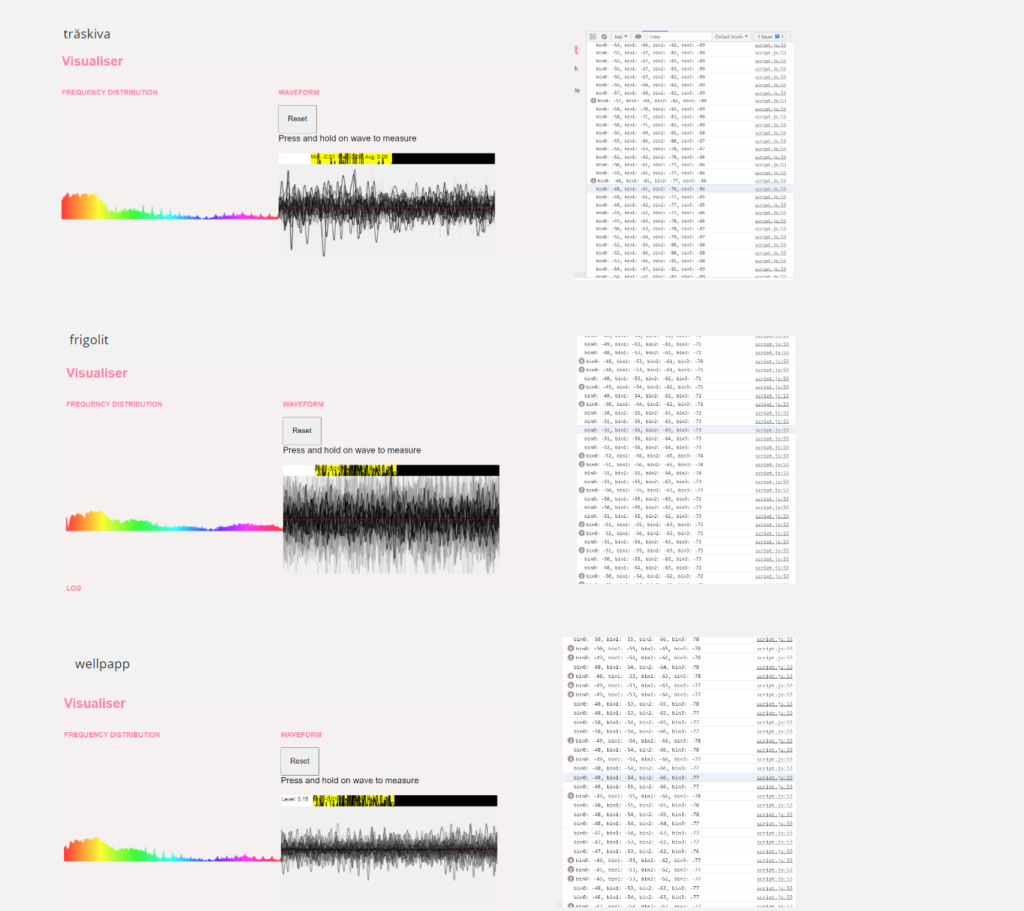
Today we have continued exploring different materials to see if we could find material-specific frequencies. We tested the different sounds that corrugated cardboard, styrofoam, paper, and plywood make when rubbed against a concrete surface and rubbed with the same material. We tried to see if there was any difference in the frequency.

After the material test, we decided to create a webpage that changed background color depending on what material we used to produce sound.

I was surprised that how we perceive sound is quite different from how the mic picks it up and how the computer reads it. We had similar values for the different materials, even though I thought they sounded very different when hearing the sound. The testing with sound was quite disappointing, and I felt that it didn’t give us anything to work with. At this stage, I felt that we didn’t have any direction on what we were doing.

Coaching with Clint

Clint encourages us to go back to the nuanced control and try to unpack what it is for us. This was hard but after some discussion, we discussed what nuance control when swimming, running, and play an instrument can be. From this session, we started to see new aspects such as:

  • Envionment- working as an enabler or as something that creates resistance. Sometime it can be both. E.g. when swiming, the water is both holding you back but it is also the thing that makes it possible to swim. Depending how the water is it easier or harder to swim.
  • Timing – how and when we make an interaction play a part in how the whole activity plays out. E.g. when a skilled runner plans their running they calculate in factors such as for how long they will run and how they can time their runnig to get the best result.
  • Force/Speed – the force and speed is impacted by both the enviroment and the timing and when you can control these together then the control starts to be nuanced. E.g. when should a runner change the runnig pace to get the best endurance based on how the enviorment is.

We now feel that we have a better understanding of nuanced control, and we can continue to build on our sketches.

24/9

End of week 1

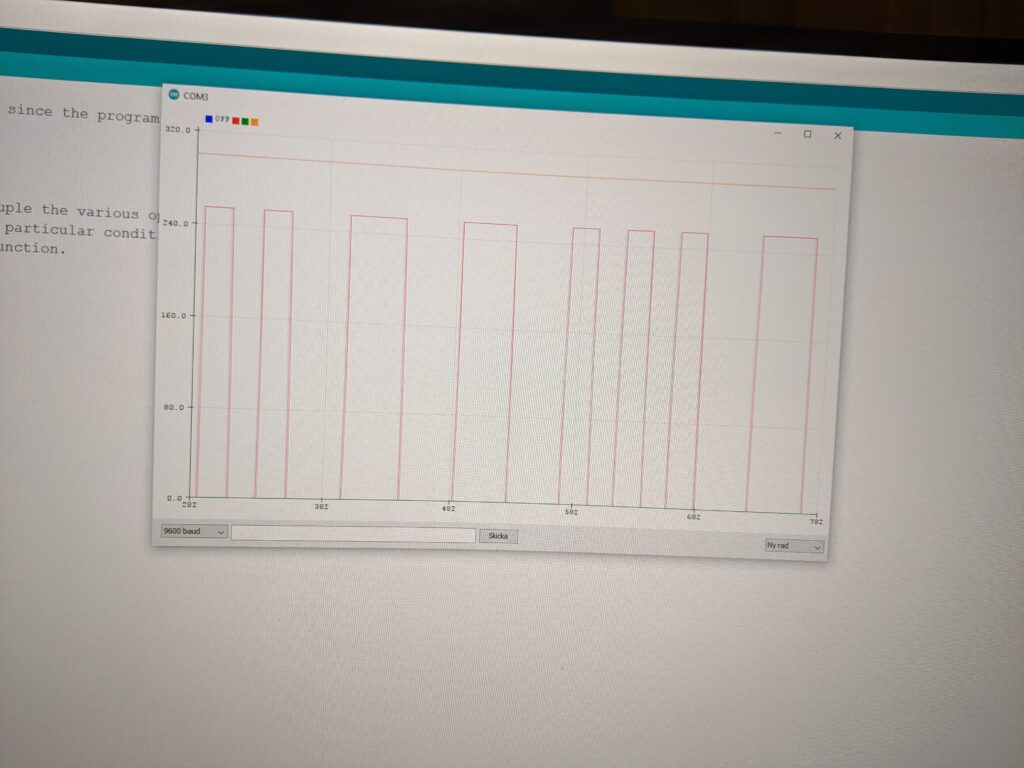
For this week, we have focused on getting an understanding of the code and for the module. We have made two sketches. The first one is the Rotator. With this sketch, we wanted to control an object based on volume. The object moves at different speeds depending on the volume, and if there is no sound input, the rotation will slow down and finally stop.

The sketch worked, but perhaps not as smooth as we wished, but we decided to explore the code more instead of refining our sketch. I think this was the right choice for us since this sketch only was to understand the code and make an example where we could use sound as an input.

We wanted to test and learn more about using two microphones for our next sketch, so we decided to create a sketch where one mic controlled the x-axis, and the other controlled the y-axis.

This sketch was more responsive and gave you the feeling of it responding to the background sound. But we didn’t have much control over the movement.

We had discussed that we might want to work with different materials and how sound is affected by the material. To better understand this, we decided to test how sounds are played through material changes. We did this by playing different sinus waves through the material and picking up how the sound changed. We thought we would find more differences and were a little disappointed in the result we got. There was no significant difference between playing through a material or just picking up the sound direct from the speaker. Looking back at it, I can now see that perhaps we should have tried more and with other kinds of sounds, more natural sounds, and then we might have got another result.

To be able to take a new step in the process, we discussed it with Jens. He helped us break it down and suggested that we focus on small sketches that only had simple interactions and later build on them to create an interaction with the nuanced control. I think this will help us with the process since I tend to try to do everything at once, and then it gets too big and complex from the beginning. It is also harder to evaluate the interaction and the nuance of control when adding different interactions.

M2 21/9

The introduction that we had yesterday helped to get a better understanding of the module. The biggest hurdle is to understand the code examples provided by Clint. I feel that the introduction gave me a grasp of how it works, but I need to take some time to understand it.

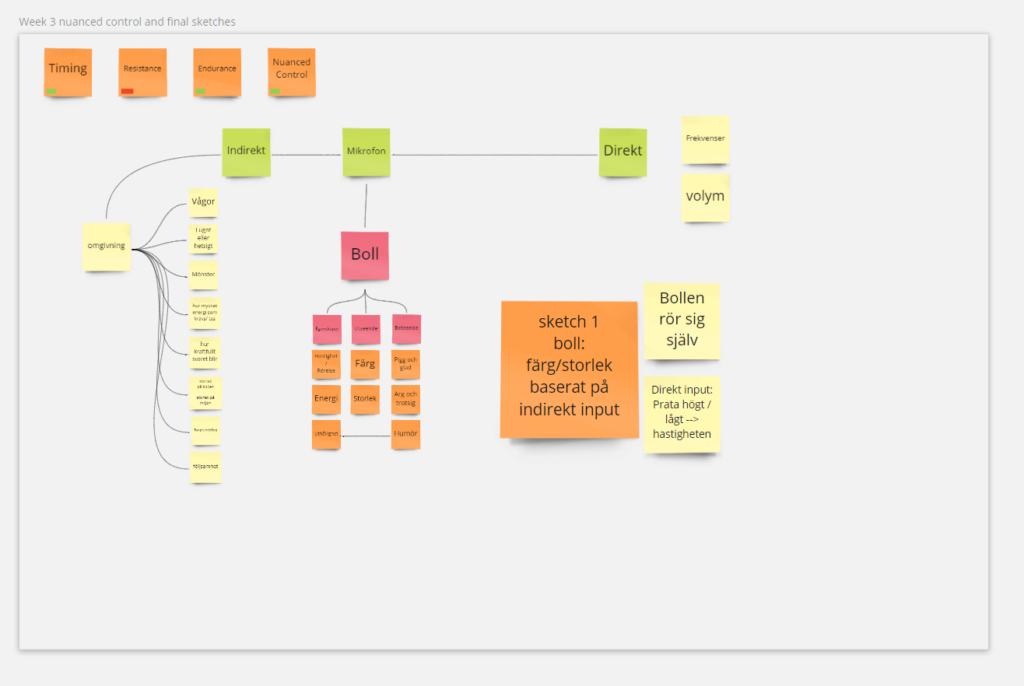
Today we started the day by discussing yesterday’s lecture to get a shared understanding of what we want and what we are doing. Our first discussion was about how we should think about the interaction. Does it require direct human interaction, or can we see the sound environment as its own gestalt that affects us differently? This is something we will bring up in the next coaching session.

We then started to discuss sound as an environment and it giving the surrounding a texture. We decided to test how a “quiet space” sounds by using a sound spectrum analyzer. We took a walk around the university to see how background noise that we usually don’t realize is a part of the sound environment.

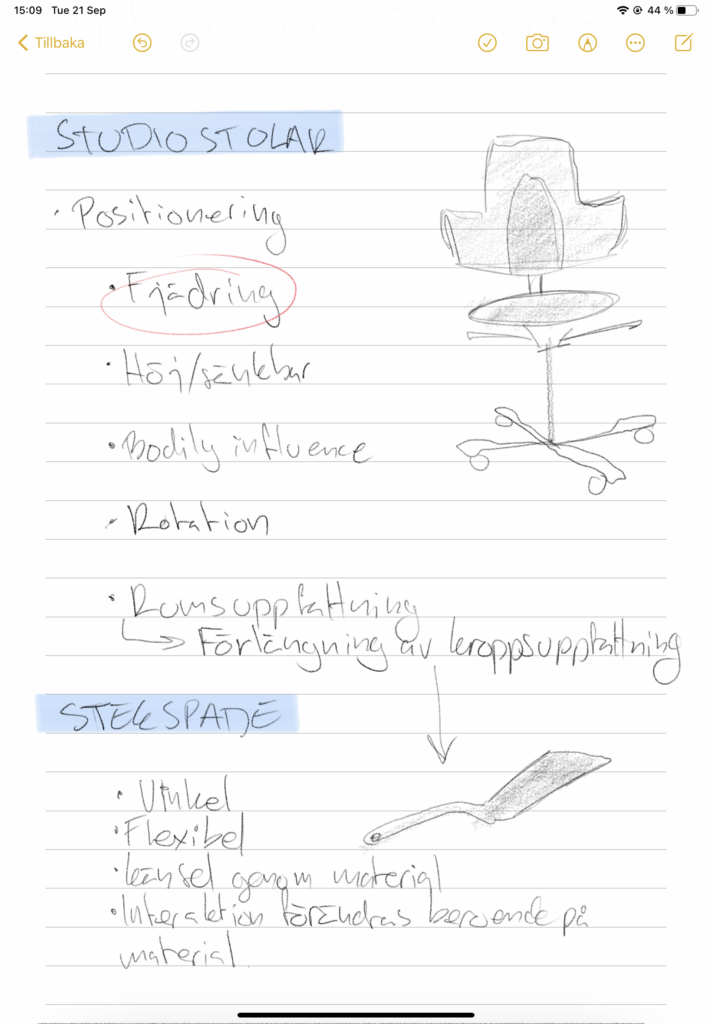
Seeing how the sound is represented in the code was the next step. We managed to connect our phones, so we got inputs from two microphones. After playing with the code for a bit, we decided to start brainstorming on the topic of nuanced control and try to see if we can find examples of control and then try to find qualities in that specific control. Our first subject of control was the studio chairs.

Studio chair

  • control of heigth- fluid for bigger adjustment, stepwise for maximum conrol
  • rotation – increasing and decreasing amounts of force to find right posititon
  • moving the chair – combination of balance, speed affected by the floor material

cooking spatula

  • moving/ picking something up – force, angle and the flexibilety of the material
  • controlling degree of cooking -feeling through material

I didn’t feel that we got a grip of the nuanced control, and I think we need to come back to this. Since we didn’t think that we got the nuanced control part and needed some coaching, we decided to continue with the code and make a first sketch to understand how some of the code work. The first sketch was just to change the page’s background by using min, max, and average values for the RGB values.

Show and tell M1

The first show and tell were fun. It is interesting to see how different everyone’s projects were and also learn from their projects. Some groups had worked with the material more, and that is something that I wish we had done more, but we didn’t have the time for it. So that is something that I will think of in the next module.

The feedback we received was good, and some of it was already things that we had been discussing but just not managing to explore further. Playing with the non-interactive phase that we had in our project to see how a lack of interaction also is a kind of interaction and how this can be designed. I also wish that we had been able to continue working with the irritation and let the interaction be remembered over a longer timespan to see how it would affect the interaction.

I feel like this module has been a warm-up. I have felt lost, irritated but now I start to see what it is we are doing. And I think that the next module will be a chance to take the next step and do more off unpacking and exploring both the topic and the material.

16/9

After a struggle with the code, we now feel that we have a representation of being irritated.

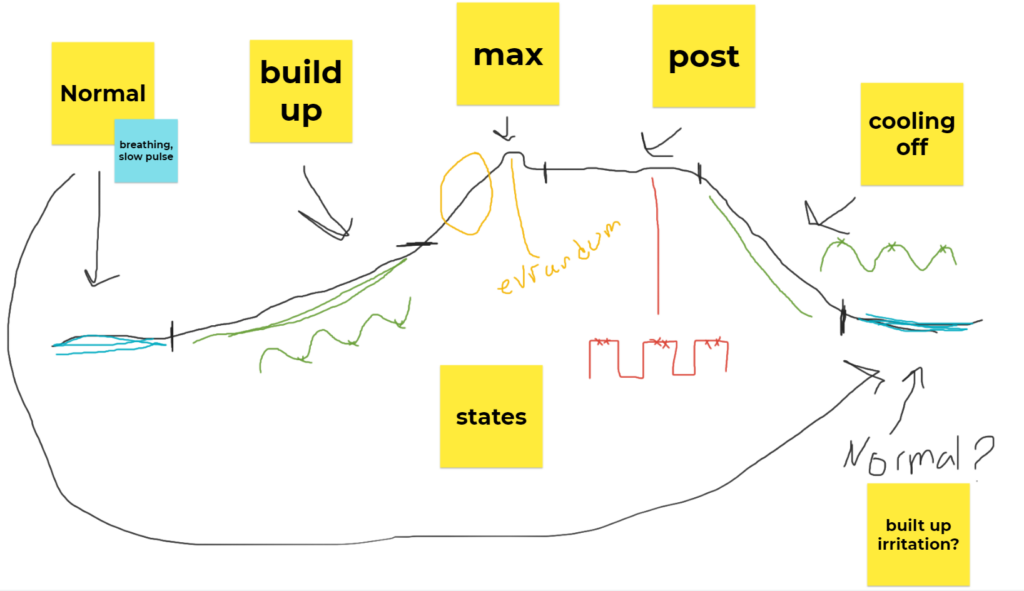
The LED now has a light behavior that is affected by the surrounding light conditions. When the sounding get darker, the LED will be brighter and the duration between the waves will be shorter. So when you shade the light, the LED will give you an instant response. If you continue to shade, the irritation will build up. If you stop, then the irritation will decrease. When the maximum level of irritation is meet, the light will have an outburst for a couple of seconds. Then it will go into a stage where it is not responsive for a couple of minutes, and then it starts to cool off, and it will be responsive to being irritated again.

During the process, we felt the need to limit the amount of light pattern. It wasn’t understandable when too many light patterns were involved. Perhaps there is a limit to the number of light patterns you can have if it should be self-explanatory. But where does that limit go? And what is it that makes a light pattern to be understood in a non-discussable way? What is it that makes a light behavior to be interpreted in a particular way? I guess that one factor is that for some patterns, we already have an understanding for, based on what we have experienced before.

When combining different light patterns, we realized that how a transition is made is also essential for the visibility of the new pattern. We had one transition that we didn’t feel was as clear as it needed to be from the beginning. We, therefore, changed light patterns to see if it would help. And we felt happy with the new transition. But it also made us wonder if we could explore the transition. We decided to see if we could keep the old light patterns and instead tweak the transition. We tried adding a pause and also change the brightness between the two patterns. this made the change more visible, but it also made us start questioning what a transition is. Is it only the moment when the change happens, or is it more fluid? Is the brightness change a transition, or is it the change in the pattern? And how can an interaction affect the transition? It feels like there is more to explore here, but for now, it will end here.

Original transition
Transition with a pause
Transition with a change in brightness

13/9

Not much new for today. It has been a struggle to create a code that could change the light behavior when interacting. But now have new code, and we can use it to build the different states we want. It acts in the same way as the code we had at the end of last week. But the difference now is that we base the value for brightness and the duration of the wave on the values of the LDR, which gives us the possibility to use it in the later stage when we want to create more states. And everything is based on percentage.

I have felt that the lack of coding knowledge heavily affects the possibility of exploring and trying different concepts. We want to test ideas, but we barely manage to test one or two ideas since we don’t have the time to make the code work.

Week 2

We managed to create a code that could add a mood to the light, and that also added more mood depending on from which distance you provoked it. Since we wanted different reactions depending on what kind of interaction you were doing in our case how much light you were taking away from the lamp, we started to test if you could have different states that kicked in at different thresholds.

Trying to give the LED a mood and depending on how close you are to the LDR, the mood increases. This is showed by the LED responding with a faster blinking.

Before continuing on this project, we had coaching with Clint, which changed our view of how we could represent this angry mood, where the behavior of the light was more dynamic and responsive.

After the coaching, we felt a bit lost again and therefore decided that we needed to step back and figure out what we are doing. This leads to perhaps the most important insight of the week. We have been talking about wanting to create a light that has a life, and that will react to interactions and see the interactions as a disturbance and get angry. But taking a step back and trying to map out what we wanted to express and connect it to examples in the real world made us realize that what we wanted to do was create a lamp that reacts to interaction with irritation.

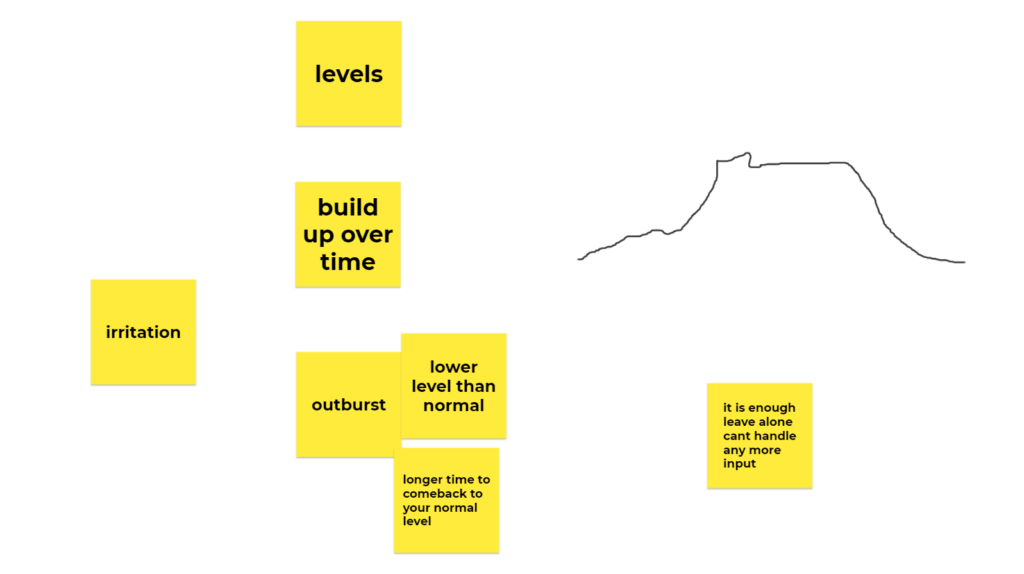
That leads us to brainstorm around how dose irritation takes an expression. Based on our own experiences and from situations we have experienced, we created a first plan for how we wanted the LED to react. Drawing from our own experiences as a starting point, we now need to test if the LED can express this. Can we create the feeling of the LED being irritated, or would someone who has never seen it or heard about it interpret it differently?

Brainstorming about irritation based on our own experiences
First ideas about the different light patterns for different stages of irritation

We will now try to create a light behavior with different states depending on the level of irritation.

9/9

Starting the morning by testing our idea about searching for a position by adding more light and let the LED indicate when you are at the correct position by increasing the brightness.

It showed that it worked, but after showing and discussing with Roel, we decided to, instead of adding light, perhaps we should work with how the body can affect the light by creating more darkness.

Our initial idea with the box was to create a setting that would be consistent regardless of how the light conditions in the room are. But after testing it, we felt that needing a flashlight interrupted the interaction. This setup also made the LED an indicator instead of a part of the interaction.

This left us a little unsure about how to proceed and continue iterate on the work we had done. Therefore we feel a need to discuss our idea and what we were doing with Jens. After getting some coaching, we wanted to keep the feeling from interacting by increasing or decreasing the surrounding light with your body. But we wanted to give the LED a feeling of independence and, in that sense, give it a personality. And that the interaction with it could be more of a provocation or interference with it.

We want the light to have some mood and that the interaction can affect the mood and the response. Like an animal being provoked, it can defend itself by attacking, playing dead, or running away. We wanted to test if this relationship between the interaction and the LED could create this feeling. Our next step is to create some code that can measure the mood of the light.

Today was the first day that I felt that I had a sense of what we were doing. But still, I find it hard to understand what I am supposed to pick up from this module. I only get confused when we get feedback, like is it an interesting interaction. I have no idea about what makes an interaction interesting or not. But perhaps it is about trusting the process and keep trying. I think that I am still to lock in what it should be instead of what is the possibility and the potential of the LED in the interaction.

Finding your way with light

Perhaps we have found a direction now that will lead us to something interesting. We have had a real struggle to get some feeling for what we are doing. After setting up the LED with a force sensor as an input, we received different values instead of an on and off state. Based on the possibilities to get different values, we went back to an idea that we had the first week about the possibility of getting a sense of direction through the LED. Our inspiration came from a game where you are trying to find a hidden object, and you get help by receiving an indication of if you are getting closer or farther away from it.

We wanted to explore if you can get a sense of direction with the help of different light patterns. Like a lighthouse, we want the LED to give the person an indication of if it is on the right track. This made us change from a force sensor to an LDR sensor to use light for both the input and the output.

The first example of getting the LDR to turn the LED on and off.

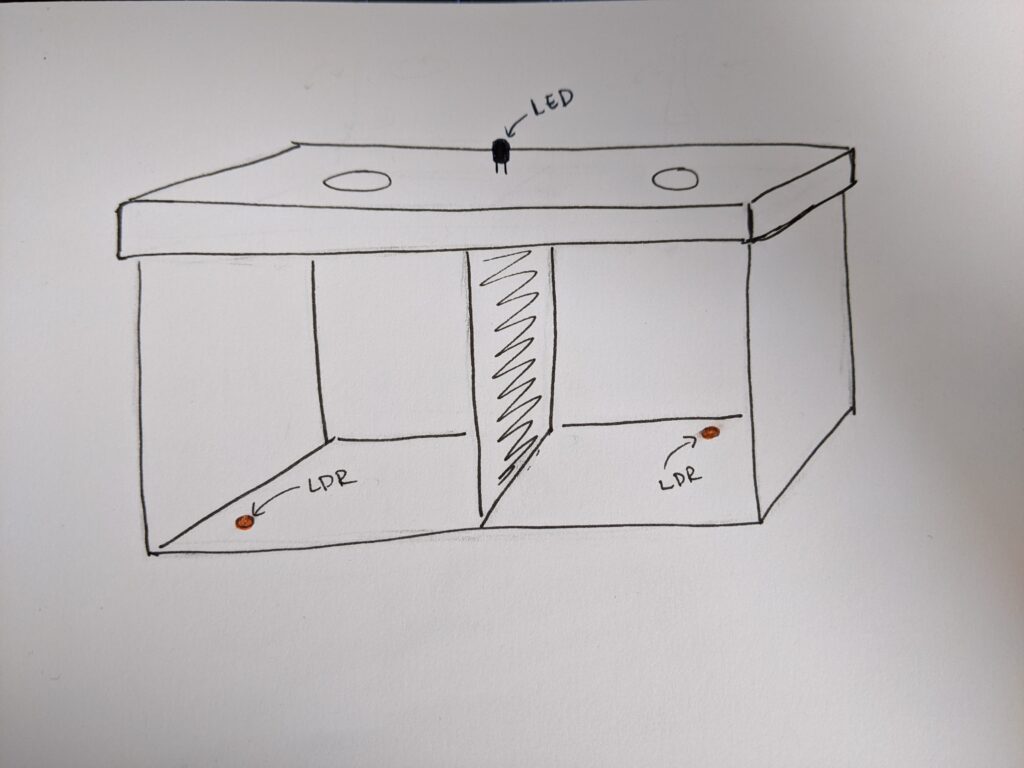
We want to test to see if the brightness of the LED combined with how often it blinks can work as a way of getting a direction. We have an idea about testing this in a box to see if you can find the “right” position in the box by searching with the help of two lights and when you are in the right place, you will receive a fully lit LED that has a consistent light. One side will determine the brightness, and one side will determine the pulse of the light pattern. The further away you are, the longer space you will have between the lit states of the pulse.

One box with separated sides with one LDR on both sides. One control the brightness, and one control the pulse of the light

We will start by testing the concept with one LDR to see if it can give a feeling of direction. We have created a sensor that controls the brightness depending on the amount of light the LDR receives.

The next step is to quickly prototype it in a box to see if we can use light to find direction and if the LED can communicate this. But for now, it feels great to finally have some direction to what we are doing, and I hope that we will find interesting insights that we can iterate on.

Input sensors

Today we have worked with inputs and trying to see how they can be used.

The first example was to manage to connect a button to the LED to turn it on and off. You would think that it was done in 5 minutes, but how long it takes to create it is painful. But after making it work, we decided to test to connect the force sensor. When it was working, we wanted the brightness of the LED to increase as the pressure of the sensor increased.

Now we have a way of controlling the LED, based on the interaction with the sensor. We are still not sure what to do, but now we are one step closer to be able to interact with the LED.

Week 1

After the lecture Interaction Astetichs with Clint, I understood the paper Exploring Relationships Between Interaction Attributes and Experience by Lenz et al. (2013). I had not made the connection between Interaction attributes and the experience and how it should be interpreted. Doing the group exercise helped even though it was when presenting I realized that I might have misunderstood it from the beginning and missed the nuances, e.g., that slow was more about enjoying the process itself.

How we are going to use this in our project is still unclear for me, and during this first week, I have felt a bit lost about what we are doing, and I am not sure if we are focusing on the right aspects. We have concentrated on freshening up our Arduino skills and just testing to create different light patterns.

Lenz, E., Diefenbach, S., & Hassenzahl, M. (2013). Exploring relationships between interaction attributes and experience. In Proc. of the 6th Int’l Conf. on Designing Pleasurable Products and Interfaces, pp. 126-135.

Interaction-Driven Design: A New Approach for Interactive Product Development

In this paper by Maeng et al. (2012), they explore how interaction-driven design can affect the design process of interaction compared to user-driven design and Technology-driven design. Different approaches create different starting points for the design activity.   In user-driven product development, the starting point is based on users’ needs and solving their problems. In technology-driven product development, it is instead the new technology and their possibilities in the new design that is the starting point for the interaction. In interaction-driven product development, the starting point is more of exploration based on interaction concepts. In the paper, movement was used as a starting point for the design of the interaction and based on the findings, they could create and incorporate them in the design of the product and find new links between the user’s needs and the technology.

This is a new way of thinking for me, and I guess it is because our previous experiences have been projects with a user-driven approach. I hope I will feel more comfortable with the interaction-driven design, and I hope that we will manage to use this idea of letting the interaction drive the exploration when we work with our project.

Maeng, S., Lim, Y. K., & Lee, K. (2012, June). Interaction-driven design: A new approach for interactive product development. In Proceedings of the Designing Interactive Systems Conference (pp. 448-457).

Unlocking the Expressivity of Point Lights

In the paper Unlocking the Expressivity of Point Lights by Harrison, Chris, et al. (2012), the authors present a design process where they start by looking at what information commonly is communicated through LEDs and how it is done. They found that the LED:s are used to display different information, but there is not much variation in how it is communicated. Through a design session, they came up with light behaviors and a vocabulary for light states e.g. The device has a low battery. To test if the light behavior communicates the information, they made user tests. The aim was to see how well light behavior correlated with the informational state. The users would rate how well they disagree or agree with an interpretation of the behavior.

They found that even though it’s hard to find a light behavior that clearly signals one function/situation, you can find light behaviors that have a strong connection to a category of functions/situations and those could be used as a starting point when designing light behaviors.

Reading the paper gave me a feeling of recognition. During the prototyping course, we worked with movement as a way to interact with a plant. We also found it hard to find a movement that everyone interprets the same way, but we could see that some movement was interpreted in the same category eg the plant is lacking something. Also, the fact that small adjustments can change the whole concept or interpretation of the interaction was something that we experienced during that work.

Reading the paper and having the prototyping course experience leaves me wondering how much information one medium can carry and still being understandable. Perhaps we can’t and shouldn’t design for minor details but instead focus on the broader understanding of a behavior. Maybe this is something that I will be able to explore in or project.

Harrison, C., Horstman, J., Hsieh, G., & Hudson, S. (2012, May). Unlocking the expressivity of point lights. In Proceedings of the SIGCHI Conference on Human Factors in Computing Systems, pp. 1683-1692.

Exploring LED pattern

Today we have used Roel’s example code to be able to get started with creating different light patterns. We managed to test out some of the light patterns in the Point lights paper, and I think it was a good start.

Puls
Blinking with change in the off state
EKG
Candle

The biggest challenge is translating what we have learned in the programming course using JavaScript to the Arduino IDE. I don’t have much pre-knowledge of using Arduino, so I guess it will be some struggle. To only have one LED light to work with feels like a good way to learn how to work with constraints and work with the material itself to see how interactions can be made in different ways and how small changes can affect the outcomes.

Interactivity – introduction

I am excited about the new course, and I feel like it is a whole new approach to the design process. I am still confused about what we are supposed to do, but hopefully, I will better understand that when this first week is over.

I am glad that we are working in pairs. It feels like a perfect setup for exploring and figuring out how to make our ideas come to life and have someone discuss how the results became and how we can iterate on them.

The first thing we did was to talk about our prior experience of journaling.

This time I will try to make some changes:

  • Try to reflect more.

Last time I did a lot of describing, which also led to me missing out on reflecting on the process. This time I will try to make short journal notes during the week. And then try to have one post where I can reflect more on the week’s work.

  • Document everyting.

Last time I often forgot to take photos or videos during the work process. Another thing is that I will organize how I collect everything, so it is quick and easy to find material for my journal.

Now I am looking forward to getting started.